

Install the Macroscope app on your GitHub organization first. Go to app.macroscope.com to link your org.
- Admin setup (one-time, per organization). Follow this page.
- Developer setup (per developer). See Developer Quickstart.
Initial admin setup
- Log in via GitHub at cloud.murmur.dev.
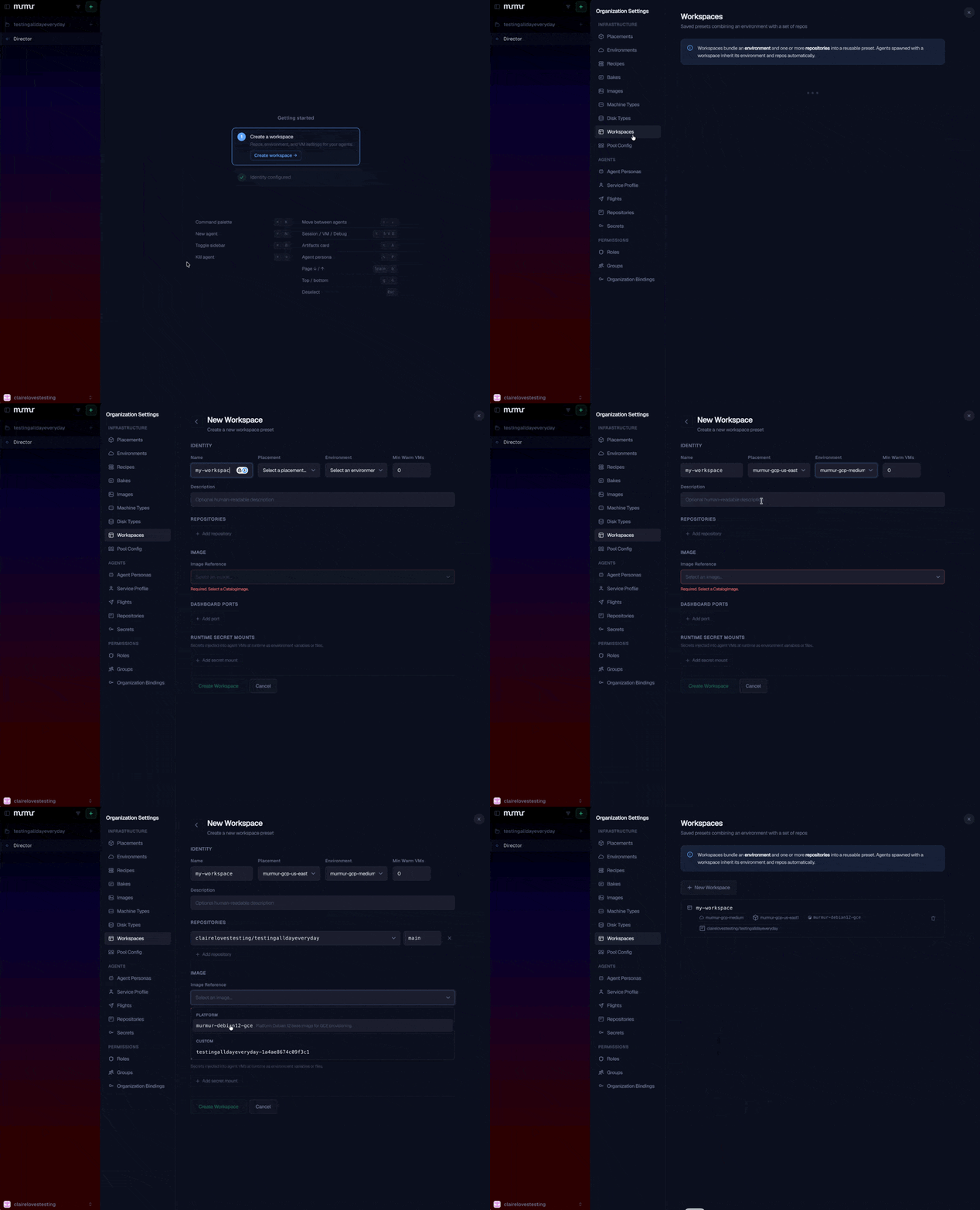
- Open Organization Settings → Workspaces and click + New Workspace.
- Fill in the form:
- Name: what you want to call this Workspace (e.g. your team or project name, like
acme-backend). Must be lowercase letters, digits, and hyphens. This name is what your developers will reference when spawning agents. - Placement: select
murmur-gcp-us-east1. - Environment: select
murmur-gcp-medium. - Repositories: click + Add repository and pick the repos your agents will work on.
- Image Reference: select
murmur-debian12-gce.
- Name: what you want to call this Workspace (e.g. your team or project name, like
- Click + New Workspace.
- (Optional) Set up a Service Profile so you and your team can run agents under a shared bot identity.
CLI setup
CLI setup requires a GitHub account, thegh CLI (authenticated via gh auth login), and a Claude API key or Anthropic subscription.
Step 1: Install the CLI
Step 2: Navigate to your repository
cd into the repository where you want your Murmur agents to work.
Step 3: Set up
- Gathers your credentials (GitHub, Claude, optionally OpenAI)
- Generates an SSH signing key, and optionally uploads the public key to GitHub for verified commits
- Bookmarks your tenant and Workspace in
.murmur/murmur.yaml(committed) - Writes your encrypted personal profile to
.murmur/murmur.local.yaml(gitignored) - Uploads your encrypted profile to the platform so the dashboard can spawn agents on your behalf
- Registers the Murmur MCP with your coding agent (e.g. Claude Code)
When prompted to add the Murmur MCP, say Yes.
Step 4: Commit your tenant config
murmur setup writes two files into .murmur/:
murmur.yaml: your shared tenant and Workspace pointers. Belongs in version control.murmur.local.yaml: your personal encrypted credentials. Stays on your machine. The wizard adds it to your repository’s root.gitignoreautomatically.
murmur setup in a fresh clone skips the tenant and Workspace prompts and goes straight to credentials.
Next steps
Spawn your first agent
Launch an agent into your new Workspace.
Customize your Workspace
Run
murmur init to bake a custom Image for your toolchain.Developer quickstart
Onboard the rest of your team.
Core concepts
Agents, Workspaces, Pools, Flights, Events, and the rest of the model.